
PHILIPPINES ID GUIDE 2026 EDITION
List of Valid IDs in the Philippines (2026)
Looking for Valid ID you can use? Explore 25 commonly used identification documents in the Philippines, with details on requirements, fees, issuing agencies, and how to apply.
Updated for 2026
25
IDs Covered
2026
Latest Guide
₱
Fees & Costs
Quick answer
What Counts As a Valid ID?
A valid ID is an official document accepted as proof of identity for a particular transaction. The National ID has special legal recognition under RA 11055 and is sufficient proof of identity, subject to authentication. If you do not have an ID, you can start with free PhilSys registration. You can also apply for a Postal ID as another form of identification.
National IDPhilSys (free)Postal ID
One is enough
RA 11055 makes the National ID sufficient on its own. No office can demand a second ID when you show it.
Same-day option
Postal ID on rush is released the same day or the next working day at select branches, for ₱650.
Free to get
National ID, PhilHealth, TIN, Senior Citizen, and PWD IDs cost nothing. Anyone charging you is a fixer.
Primary vs Secondary: Who Actually Decides
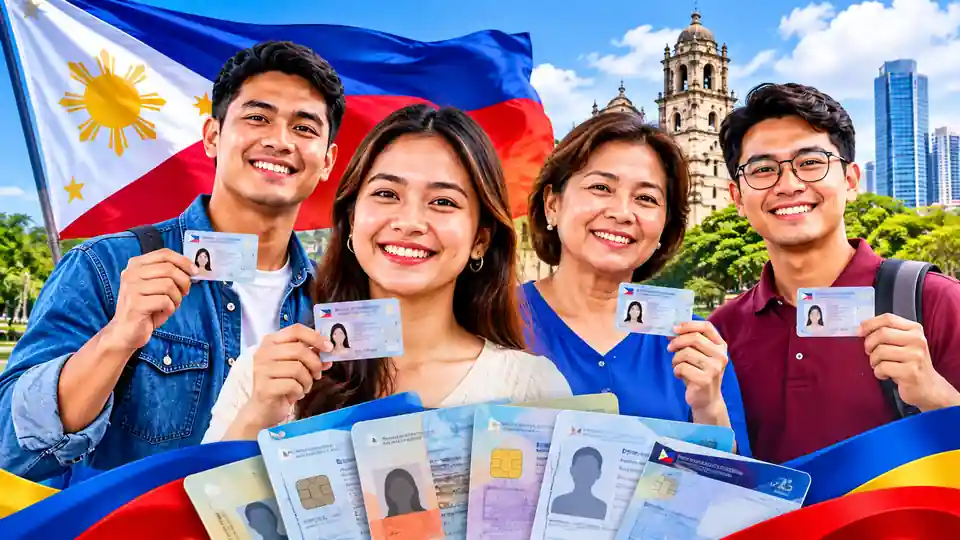
Usually treated as primary
Passport, driver’s license, UMID, National ID, PRC ID, Postal ID. Hand one over and you are usually done.
- PVC card, hard to copy
- Biometrics captured and on file
- QR code or machine-readable zone
- Complete address printed on most of them
Usually treated as secondary
TIN ID, PhilHealth, barangay ID, company ID, NBI clearance. Government-issued for the most part, but thinner documents.
- Often no QR code to verify against
- No fingerprints on record
- Address incomplete or missing
- Some are paper under lamination
Every Valid ID at a Glance
This guide covers 25 commonly used IDs and identity documents in the Philippines, including who issues them and how much they cost.
| Valid ID | Issued By | Type | Cost |
|---|---|---|---|
| National ID (PhilSys) | PSA | Primary | Free |
| Philippine Passport | DFA | Primary | With fee |
| Driver’s License | LTO | Primary | With fee |
| UMID | SSS / GSIS | Primary | Free first card |
| PRC ID | PRC | Primary | With fee |
| Postal ID | PHLPost | Primary | ₱550 / ₱650 rush |
| SSS ID / MySSS Card | SSS | Primary | With fee |
| GSIS eCard / Digital ID | GSIS | Primary | Issued to members |
| Voter’s Certification | COMELEC | Primary | With fee |
| Senior Citizen ID | OSCA | Primary | Free |
| PWD ID | LGU / NCDA | Primary | Free |
| OWWA ID / iDOLE Card | OWWA / DMW | Primary | Covered by OWWA membership |
| Seaman’s Book (SIRB) | MARINA | Primary | With fee |
| ACR I-Card | Bureau of Immigration | Primary | With fee |
| PhilHealth ID | PhilHealth | Secondary | Free |
| TIN ID | BIR | Secondary | Free |
| Pag-IBIG Loyalty Card Plus | Pag-IBIG | Secondary | With fee |
| Barangay ID | Barangay | Secondary | Small fee |
| Company ID | Employer | Secondary | Issued by employer |
| School ID | School | Secondary | Issued by school |
| NBI Clearance | NBI | Secondary | With fee |
| Police Clearance | PNP | Secondary | With fee |
| Solo Parent ID | City / Municipal Social Welfare Office | Secondary | Free |
| DSWD Certification | DSWD | Secondary | Free |
| Cedula | City / Municipal Treasurer | Secondary | Varies by LGU |
Primary IDs
Primary IDs Philippine: Types and How to Get Them
The IDs below are commonly used as primary identification. However, acceptance depends on the bank, government office, or service you are dealing with. Some documents may only be accepted for specific transactions or may require additional proof of identity. Check the receiving office’s requirements before applying or visiting.
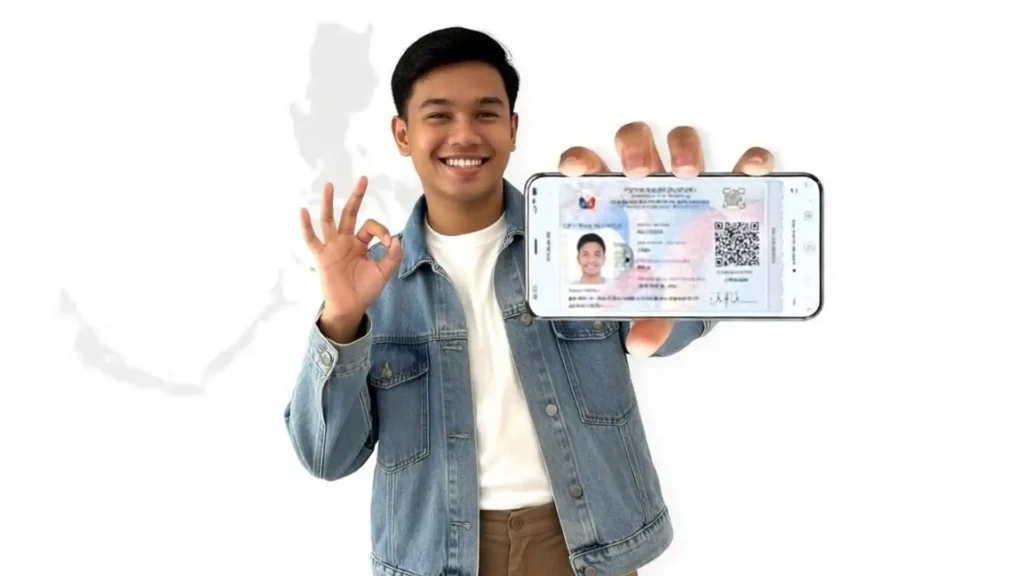
National ID (PhilSys)
The National ID is an official proof of identity in the Philippines. Under RA 11055, it is recognized as sufficient proof of identity, subject to authentication. You can use its physical, printed ePhilID, or Digital National ID format, depending on the requirements of the office or service. Registration is free, and the National ID does not expire for adults.
To get it:
- Register at any PhilSys registration center.
- Bring the original of an accepted supporting document. One primary option is your PSA Certificate of Live Birth together with a government-issued ID showing your full name, photo, and signature or thumbmark. A Philippine passport, UMID, or eligible LTO license can also qualify.
- If you do not have a primary document, check the official PhilSys list of accepted secondary documents.
- Complete the registration process and provide your personal details.
- Have your photo, fingerprints, and iris scan captured, as required.
- Wait for PHLPost to deliver the card to your address.
- While you wait, open the eGovPH app and download the Digital National ID. Banks accept it.
Note: Registration and delivery are free. Do not pay anyone to register for you, and do not buy a printed PVC copy from Facebook sellers.
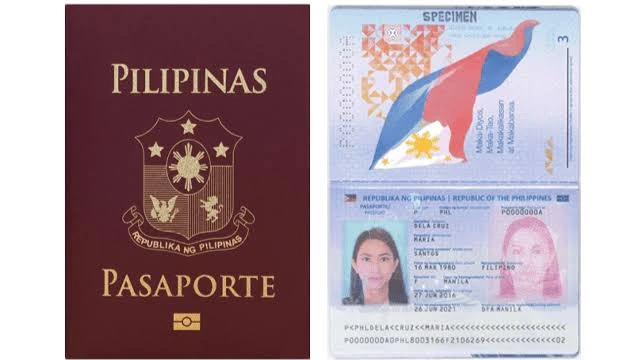
Philippine Passport
A Philippine passport is an official travel document issued by the Department of Foreign Affairs (DFA). It is also widely accepted as proof of identity in banks, government offices, and other transactions. Passports are generally valid for 10 years for adults and five years for applicants below 18.
To get it:
- Book a slot at passport.gov.ph. Slots open at set times and fill fast.
- Bring your PSA birth certificate and one valid government ID.
- Appear at your chosen DFA site for encoding, photo, and fingerprints.
- Pay the processing fee at the cashier.
- Claim it at the branch or pay for courier delivery.
Note: Book only on the official DFA site. Fixers who sell appointment slots are a scam.
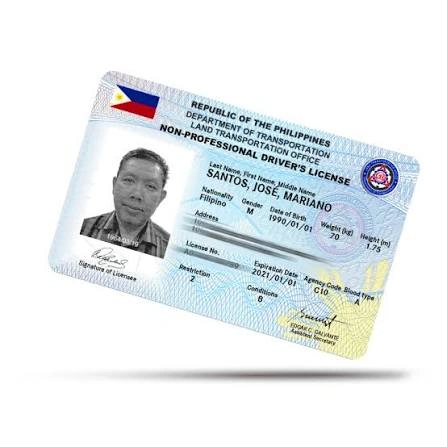
Driver’s License
A Philippine driver’s license is issued by the Land Transportation Office (LTO). It contains your photo and personal details and is widely accepted as proof of identity. You can also use it for transactions that require a government-issued photo ID, subject to the receiving office’s requirements.
To get it:
- Apply for a student permit first at any LTO office or licensing center.
- Pass the theoretical exam and the medical exam.
- After one month on a student permit, apply for a non-professional license.
- Pass the practical driving exam.
- Pay at the cashier, have your photo taken, and claim the card.
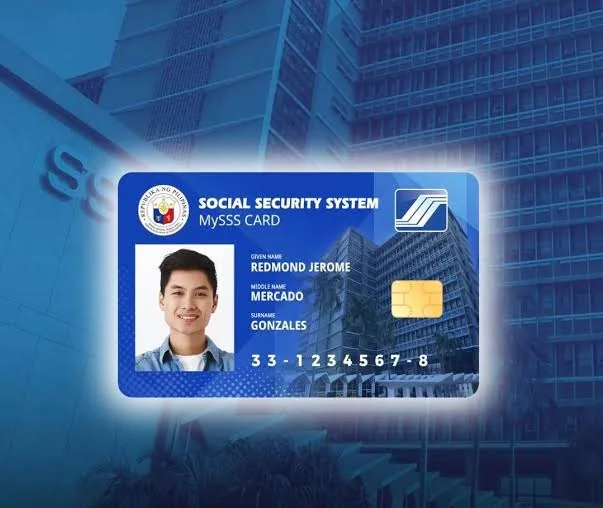
UMID/ SSS ID / MySSS Card
The Unified Multi-Purpose Identification (UMID) Card was issued to eligible members of the SSS and GSIS. It contains the cardholder’s personal details and biometric information. If you already have a UMID card, you can continue using it because previously issued SSS cards remain valid.
In October 2025, the Social Security System introduced the MySSS Card, which replaces the old UMID card for new SSS card issuance. It works as an SSS identification card and a debit card linked to a partner bank account.
To get it:
- Make sure you have a permanent SS number and an active My.SSS account.
- Update your address, mobile number, and email address in your SSS records.
- Make sure you are registered with the National ID system.
- Log in to the My.SSS Member Portal.
- Open the MySSS Card option under the Services menu.
- Check your personal details and complete the identity verification process.
- Choose an available partner bank and follow its instructions to open your account.
- The bank will issue your MySSS Card after completing the required checks.
Important: The MySSS Card is accepted for SSS transactions. Other government agencies and private institutions are not required to accept it as an official ID. Acceptance depends on their own policies. Banks may also have separate identification requirements.
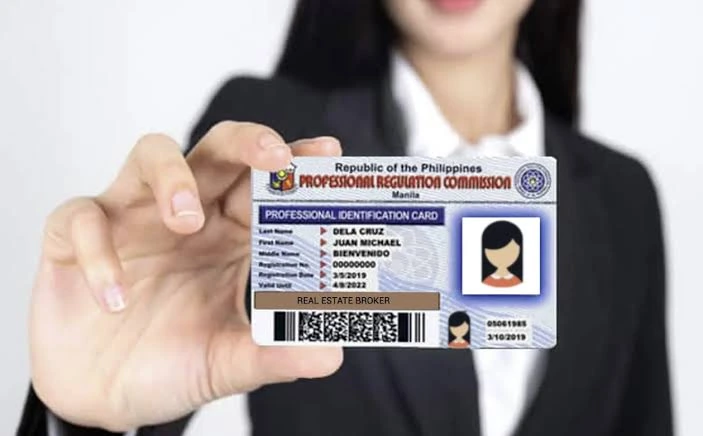
PRC ID
The Professional Identification Card (PIC), commonly called the PRC ID, is issued by the Professional Regulation Commission to licensed professionals such as nurses, teachers, engineers, and accountants. It proves that the holder is registered with the PRC and is authorized to practice their profession. The card is valid for three years and must be renewed.
To get it:
- Create an account on the PRC LERIS portal at online.prc.gov.ph.
- Complete the registration process after passing your licensure examination.
- Choose your appointment date and PRC office.
- Pay the fee through the portal or an accredited payment center.
- Attend your appointment and follow the instructions to claim your PRC ID.
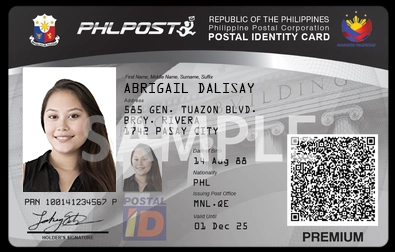
Postal ID
The Postal ID is a government-issued identification card provided by the Philippine Postal Corporation (PHLPost). It contains your photo and personal details and helps verify your identity and home address. It is useful for people who need a government-issued ID for banking, passport applications, and other transactions.
To get it:
- Get the application form at any post office or download it from phlpost.gov.ph.
- Bring a Barangay Certificate as proof of address. If you cannot provide one, ask PHLPost about other accepted documents, such as a recent utility bill showing your name and current address.
- Pay ₱550 for regular or ₱650 for rush.
- Visit a participating post office in person.
- Submit your documents and have your photo and biometrics captured.
- Wait 10 to 15 working days, or same day to next day on rush at select branches.
Note: Since 2026, first-time Filipino applicants no longer need another government ID. A birth certificate and proof of address are enough.
Voter’s ID / Voter’s Certification
A Voter’s Certification is an official document issued by the Commission on Elections (COMELEC). It confirms that your name appears in the list of registered voters. You can request it from COMELEC if you need proof of voter registration for a government transaction or another purpose.
It is different from the old Voter’s ID card. COMELEC now issues a certification instead of a new physical Voter’s ID.
To get it:
- Visit the COMELEC Office of the Election Officer (OEO) in the city or municipality where you are registered.
- Bring a valid ID.
- Ask for a Voter’s Certification and complete the request form.
- Pay the applicable fee, if required.
- Follow the office’s instructions to receive your certification.
If someone else will request it for you, they may need an authorization letter and their own valid ID. Contact your local COMELEC office to confirm the current requirements and fee before visiting.
Note: A Voter’s Certification is valid for one year from the date it was issued.
Senior Citizen ID
The Senior Citizen ID is issued by the Office for Senior Citizens Affairs (OSCA) through your city or municipal government. Filipino citizens aged 60 and above can apply for this free ID. It helps seniors claim benefits under the Expanded Senior Citizens Act, including the 20% discount and VAT exemption on eligible goods and services.
You can use the physical OSCA card or access the Digital National Senior Citizens ID through the eGovPH app.
To get it:
- Go to the OSCA office in your city or municipal hall.
- Bring proof of age, such as your PSA birth certificate, and proof that you live in that city or town.
- Fill out the form and have your photo taken.
- Claim the card, usually within the same visit or a few days.
Note: It is free. No OSCA office charges for a Senior Citizen ID.
PWD ID
The Person with Disability (PWD) ID is issued by local government units to qualified Filipinos with disabilities. It helps cardholders access discounts, VAT exemptions, and other benefits under Philippine law. The ID is generally issued through the PWD Affairs Office or the designated office in your city or municipality.
To get it:
- Get a medical certificate from a licensed doctor stating your disability.
- File it at your city or municipal PDAO or social welfare office, or through the NCDA.
- Submit a filled-out application form with your photo.
- Claim the card once it is approved.
Note: Issuance is free under RA 10754.
OWWA Membership ID
The OWWA Membership ID serves as proof of an overseas Filipino worker’s active membership in the Overseas Workers Welfare Administration (OWWA). It helps members access welfare services, scholarships, repatriation assistance, and other OFW programs. Membership and ID services are handled through OWWA and the Department of Migrant Workers (DMW).
To get it:
- Pay your OWWA membership contribution before deployment or while abroad.
- Register through DMW or OWWA, at a POLO office if you are already overseas.
- Claim or receive the card once membership is confirmed.
Seaman’s Book (SIRB)
The Seafarer’s Identification and Record Book (SIRB) is issued by the Maritime Industry Authority (MARINA) to qualified Filipino seafarers. It records their sea service and serves as an important identity and employment document for maritime work. It is mainly intended for people working aboard ships, rather than general ID use.
To get it:
- Finish your basic training courses and get the certificates.
- Book an appointment with MARINA.
- Submit your training certificates, PSA birth certificate, and the application form.
- Pay the fee and claim the book.
ACR I-Card
The Alien Certificate of Registration Identity Card (ACR I-Card) is issued by the Bureau of Immigration (BI) to foreign nationals who must register under Philippine immigration rules. It contains their personal details and biometric information and serves as proof of their registration with the BI. Many foreign nationals staying in the Philippines for more than 59 days are required to obtain one, depending on their visa category.
To get it:
- File your application at the Bureau of Immigration main office or a district office.
- Submit your passport, visa, and the BI application form.
- Give your biometrics at the BI office.
- Pay the fee and claim the card.
GSIS eCard / Digital ID
The Government Service Insurance System (GSIS) provides social insurance benefits to government employees and pensioners. It previously issued the UMID eCard, which worked as an identification card and an ATM card.
In 2024, GSIS stopped producing physical UMID eCards and introduced the GSIS Digital ID through its GSIS Touch mobile app. Existing UMID and eCard holders can continue receiving their GSIS benefits. New enrollees receive an ATM card from their chosen servicing bank, either LandBank or UnionBank, for pension payments, benefits, and loan proceeds.
To get it:
- Download the official GSIS Touch app on your smartphone.
- Register or log in to your account.
- Complete the required enrollment and identity verification.
- Open the Member Data and GSIS Digital ID section.
- View your digital ID in the app.
The GSIS Digital ID is free for registered members and pensioners. It is mainly used to verify your identity and access GSIS services. Other banks and government offices may have their own rules for accepting it as proof of identity.
Secondary IDs
Secondary IDs Philippine: Types and How to Get Them
Cheaper and quicker, but bring two of them, or pair one with a primary ID.
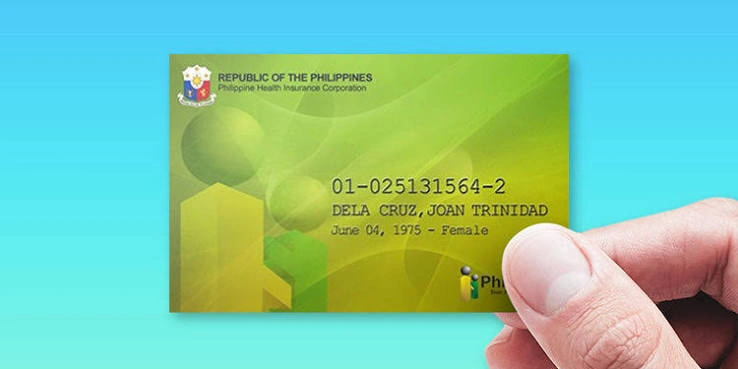
PhilHealth ID
The PhilHealth Identification Card is issued by the Philippine Health Insurance Corporation (PhilHealth) to registered members. It displays your PhilHealth Identification Number (PIN) and personal details and serves as proof of your membership. You can request the card through a PhilHealth office or PhilHealth Express center.
To get it:
- Register as a member at any PhilHealth office or through your employer.
- Fill out the PhilHealth Member Registration Form (PMRF).
- Request the ID card once your PIN is issued.
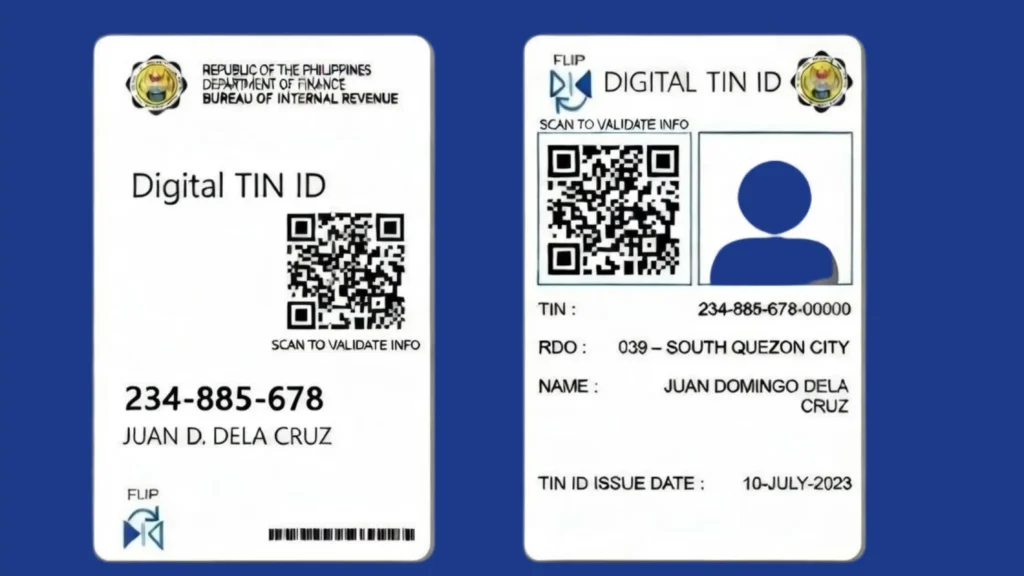
TIN ID
The Taxpayer Identification Number (TIN) ID is issued by the Bureau of Internal Revenue (BIR) to registered taxpayers. It displays your TIN and personal details and serves as proof of your tax registration. The card is free, but acceptance as a valid ID depends on the office or institution where you use it.
To get it:
- Register with the BIR Revenue District Office that covers your address or employer.
- Submit the matching BIR form, 1902 for employees or 1901 for self-employed.
- Ask for the TIN card once your TIN is issued.
Note: The TIN card itself is free. The DFA does not accept a paper or laminated TIN ID for passport applications.
Pag-IBIG Loyalty Card Plus
The Pag-IBIG Loyalty Card Plus is issued to eligible Pag-IBIG Fund members. It offers discounts at partner establishments and can also work as an ATM card when linked to a participating bank. Members can apply for it at selected Pag-IBIG branches or accredited partner banks, subject to their requirements.
To get it:
- Be an active Pag-IBIG member with contributions posted.
- Apply at a Pag-IBIG branch or an accredited partner.
- Bring one valid ID to claim it.
- Activate the card before you use it for withdrawals.
Barangay ID
A Barangay ID is issued by the local barangay to eligible residents. It contains personal details and helps verify your identity and place of residence. Some banks and government offices accept it as a secondary valid ID, but acceptance depends on the institution. You can apply at your barangay hall by meeting its requirements.
To get it:
- Go to your barangay hall with proof that you live there.
- Fill out the form and pay the small processing fee, if your barangay charges one.
- Have your photo taken and claim the ID.
Note: Ask for the version with your photo and signature. The plain paper certification is accepted in fewer places.
Company ID
A Company ID is issued by an employer to identify its employees. It usually contains the employee’s photo, name, and company details. Some banks and offices accept it as a secondary valid ID, but acceptance depends on their requirements. You can request one from your company’s HR department after joining.
To get it:
- Submit your requirements to your HR department after you are hired.
- Have your ID photo taken.
- Claim the card from HR.
School ID
A School ID is issued by a school, college, or university to identify its students. It usually displays the student’s photo, name, and school details. Some banks and offices accept it as a secondary valid ID, especially for student-related transactions. Acceptance depends on the institution and its requirements.
To get it:
- Enroll and settle your registration.
- Have your photo taken during the school’s ID capture schedule.
- Claim it from the registrar or student affairs office.
Note: Make sure it carries the current school year validation sticker. An unvalidated ID is often refused.
NBI Clearance
NBI Clearance is issued by the National Bureau of Investigation (NBI). It shows whether you have a criminal record on file in the Philippines. Many employers require it during hiring, and some offices accept it as a supporting identity document.
To get it:
- Register at nbi.gov.ph and set an appointment.
- Pay the fee through an accredited payment channel.
- Appear at the NBI branch on your date for biometrics and photo.
- Claim the clearance the same day unless you get a hit, which takes a few days more.
Police Clearance
A Police Clearance is issued by the Philippine National Police (PNP). It shows the result of a background check based on police records. Employers and some government offices may ask for it when verifying a person’s identity or background.
To get it:
- Register at the national police clearance portal.
- Pay the fee and book a slot at your chosen station.
- Appear for biometrics and claim it on the same visit.
Solo Parent ID
The Solo Parent ID is issued by local government units to qualified solo parents under the Solo Parents Welfare Act. It helps eligible parents access government benefits, discounts, and other support services. You can apply through the designated Solo Parent Office or Social Welfare and Development Office in your city or municipality.
To get it:
- File at the City or Municipal Social Welfare and Development Office.
- Submit a barangay certificate of solo parenthood and proof of your situation, such as a death certificate or an affidavit.
- Wait for assessment, then claim the ID.
Note: The ID is renewed yearly.
DSWD Certification
A DSWD Certification is issued by the Department of Social Welfare and Development to confirm a person’s eligibility or social welfare status for a specific purpose. It may be required when applying for certain government assistance programs or benefits. The requirements depend on the type of certification you need.
To get it:
- Visit your local DSWD field office.
- Request the certification tied to your program or assistance record.
- Claim it once released.
Cedula
A Cedula, also called a Community Tax Certificate, is issued by local government units in the Philippines. It serves as proof that you have paid the community tax for the year. You can obtain one from your city or municipal hall or barangay office, depending on local arrangements. The fee depends on your income and other applicable details.
To get it:
- Go to your barangay hall or the city or municipal treasurer’s office.
- Give your name, address, and income details.
- Pay the community tax and receive the certificate on the spot.
Which ID to Bring, by Transaction
Different offices accept different identity documents. The ID you need depends on the service or transaction. Here are some common examples.
Passport application
The Department of Foreign Affairs (DFA) accepts several government-issued documents for passport applications, including the National ID, UMID, driver’s license, PRC ID, Postal ID, and Voter’s Certification. Requirements can change, so check the latest accepted document list on the official passport.gov.ph before your appointment.
GCash verification
GCash accepts selected government-issued IDs for account verification. These include the National ID, passport, driver’s license, UMID, Postal ID, PRC ID, and Pag-IBIG Loyalty Card Plus. The accepted list can change, so check the ID options shown in the GCash app before starting verification.
Opening a bank account
Banks in the Philippines follow identification rules set by the Bangko Sentral ng Pilipinas (BSP). The National ID is recognized as sufficient proof of identity on its own, subject to authentication.
However, individual banks may request additional documents under their own verification procedures. Check your bank’s requirements before visiting a branch.
NBI or police clearance
The NBI Clearance and Police Clearance are commonly requested for employment and background checks. The NBI Clearance is based on nationwide records, while the Police Clearance is issued through the Philippine National Police (PNP). Check the receiving office’s requirements to know which document you need.
Before You Pay Anyone
Some government IDs and registration services in the Philippines are free. These include the National ID, Senior Citizen ID, PWD ID, PhilHealth ID, and TIN ID. Do not pay unofficial agents to process them. For documents with official fees, such as the Postal ID, pay through the authorized channel and ask for an official receipt.
Primary IDs vs. Secondary IDs
Not all identification documents have the same level of acceptance. Some institutions accept certain government-issued IDs as primary identification, while others may ask for additional documents.
Primary ID
A primary ID is generally a document that an institution accepts as strong proof of identity.
Secondary ID
A secondary ID is another document that can help support your identity when a primary ID is not available.
However, there is no single acceptance rule for every transaction. A bank, government agency, employer, or e-wallet provider can have its own list of accepted documents.
Before using an ID, check the requirements of the office or service where you plan to present it. If you have more than one identification document, bring another one as supporting proof when possible.
Which ID Should You Get First?
If you do not have any government-issued valid ID, choosing your first one can feel confusing. The best option depends on your age, personal situation, available documents, and the requirements of the issuing agency.
Here are some options to consider:
- For first-time applicants: Check whether you can register for the National ID or apply for another government ID for which you meet the requirements.
- For students: Ask your school about obtaining a school ID. You can also check the requirements for other government-issued identification.
- For employed individuals: Check whether you qualify for an SSS-related ID or another identification document connected to your employment.
- For senior citizens: Contact your local government unit about the Senior Citizen ID application.
- For persons with disabilities: Ask your city or municipal social welfare office about the PWD ID application.
- For people with limited supporting documents: Check the requirements of the National ID registration process and other available options.
Do not apply for an ID just because someone recommends it. First, check whether you qualify and whether the document will be accepted for the transaction you need.
Valid IDs You Can Apply for Online
Some Philippine identification services allow applicants to complete certain steps online. However, online registration does not always mean you can receive the physical ID without visiting an office.
Depending on the ID, you may be able to:
- Complete an online application form.
- Create an account on an official government website.
- Submit information or supporting documents.
- Book an appointment.
- Check your application status.
- Download or access a digital identification document.
Some government services provide online account registration and application tracking. Other IDs still require personal appearance, biometric collection, document verification, or physical claiming.
Always use the official website of the issuing agency. Avoid websites that promise faster ID processing in exchange for unnecessary personal information or unofficial fees.
Digital IDs You Can Show on Your Phone
Digital identification makes it easier to access your identity information without carrying a physical card. Some government services in the Philippines provide digital versions of identification documents through official websites or mobile apps.
One important example is the Digital National ID, which can be accessed through official National ID platforms, including the eGovPH app.
Before presenting a digital ID, remember these points:
- Access it through an official government website or application.
- Make sure the displayed information is clear and readable.
- Follow the verification instructions provided by the issuing agency.
- Check whether the bank, office, or service accepts the digital version for your specific transaction.
- Do not share screenshots or copies of your ID with unknown people.
A digital ID can be useful, but its acceptance depends on the applicable rules and the institution handling your transaction.
Valid IDs for Different Purposes
The ID you need depends on what you want to do. A document accepted for one service might not meet the requirements of another.
| Purpose | What to Check |
|---|---|
| Opening a bank account | The bank’s accepted ID list and account-opening requirements |
| GCash verification | The identification documents currently supported by GCash |
| Passport application | The Department of Foreign Affairs’ accepted identification and supporting documents |
| Job application | The employer’s identification requirements |
| Government transactions | The specific agency’s accepted IDs and supporting documents |
| SIM registration | The identification and verification rules of your mobile network provider |
Before visiting an office or submitting an online application, check its latest requirements. This can save you time and prevent delays.
What to Do If You Have No Primary Valid ID
Not having a primary ID does not mean you cannot start the process of getting one. You can first check which identification documents are available to you and what supporting papers the issuing agency requires.
Here are some steps you can take:
- Check your available documents. Look for your birth certificate, school records, barangay documents, or other papers that show your personal information.
- Check National ID registration. Visit the official Philippine Identification System website to learn about registration requirements and available services.
- Ask your local government office. Your city or municipal office can explain the requirements for local identification documents.
- Check other government ID options. Visit the relevant agency’s official website to see whether you qualify.
- Confirm acceptance before applying. If you need an ID for a bank account, e-wallet, or government transaction, check which documents that institution accepts.
Do not assume that a barangay document, birth certificate, or school ID will automatically replace a primary ID. The institution handling your transaction makes the final decision based on its rules.
Common Reasons an ID Application Gets Rejected
An ID application can be rejected if the information or documents you submit do not meet the issuing agency’s requirements. Even a small mistake can cause delays or require you to submit your application again.
Here are some common reasons why an ID application may be rejected:
- Incorrect Personal Information: Your name, birth date, birthplace, or other details do not match your supporting documents.
- Incomplete Application Form: You leave required fields blank or fail to provide important information.
- Missing Supporting Documents: You do not submit all the documents required for your application.
- Blurry Document Copies: Your uploaded documents are unclear, making it difficult for the agency to read your information.
- Cut-Off Documents: Some parts of your birth certificate, identification document, or other supporting papers are missing from the uploaded image.
- Expired Supporting Documents: You submit a document that is no longer accepted or has passed its validity period, where applicable.
- Name Differences: Your name is spelled differently on your application and supporting documents. This can happen because of missing middle names, incorrect suffixes, or spelling mistakes.
- Incorrect Photograph: Your photo does not meet the agency’s requirements for size, background, lighting, or appearance.
- Poor-Quality Selfie: Your face is unclear, partly covered, or does not match the photograph on your submitted ID during online verification.
- Unsupported ID or Document: You submit an identification document that is not included in the agency’s accepted list.
- Duplicate Application: You already have an application or account, but you submit another one without following the agency’s instructions.
- Damaged QR Code: The QR code on your submitted identification document is scratched, covered, blurry, or cannot be scanned.
- Incorrect Address Details: Your residential address does not match the information in your supporting documents or the agency’s records.
- False or Altered Documents: You submit fake, edited, or modified documents. This can lead to rejection and further investigation.
- Failure to Meet Eligibility Requirements: You apply for an ID without meeting its age, residency, employment, or other eligibility conditions.
- Unverified Information: The agency cannot confirm some of the information you provided from its records.
- Poor Internet Upload: Your application fails to upload properly because of an unstable connection or an incomplete file.
- Failure to Follow Instructions: You do not follow the application steps, appointment instructions, or document submission rules.
How to avoid rejection: Check the latest requirements on the issuing agency’s official website before applying. Review your information carefully, use clear document copies, and make sure all required files are included.
If your application is rejected, read the notice carefully. It may explain what needs to be corrected before you apply again. Some agencies also provide a way to submit corrected information or documents.
How to Identify a Real and Fake ID in the Philippines
Fake identification documents can look similar to genuine government-issued IDs. Some people use edited photographs, copied cards, or false personal information to make fraudulent IDs look real.
If someone presents an ID during a transaction, do not rely only on its appearance. Check its security features and use the official verification service whenever one is available.
Here are some ways to identify a genuine ID and spot possible signs of a fake one.
Check the Personal Information
Start by checking the details printed on the valid ID.
Look for:
- Full name and spelling.
- Date of birth.
- Photograph of the ID holder.
- Address, if included.
- ID number.
- Date of issue and expiration date, if applicable.
Check whether the information is consistent and whether the photograph appears to belong to the person presenting the valid ID.
However, matching information alone does not prove that an ID is genuine. Fraudsters can copy real personal details onto fake documents.
Look for Signs of Editing or Alteration
Carefully examine the ID for changes that could indicate tampering.
Watch for:
- Different font styles or sizes in the same field.
- Uneven spacing between letters and numbers.
- Blurry text around the name or date of birth.
- Scratches, peeling, or unusual marks around personal details.
- Photographs that appear pasted over another image.
- Uneven colours or backgrounds around edited information.
- Misaligned printing or unusual borders.
These signs do not automatically mean an ID is fake. Some genuine cards become damaged through regular use. Use official verification rather than making a final decision based only on appearance.
Check the QR Code
Some Philippine government identification documents include QR codes that help verify their authenticity.
For example, the National ID has an official verification service called National ID Check.
You can check a National ID by following these steps:
- Visit the official National ID Check website.
- Allow camera access if requested.
- Position the QR code inside the scanning area.
- Make sure all four corners of the QR code are visible.
- Wait for the verification result.
- Compare the information displayed on the screen with the details printed on the ID.
If the ID is successfully verified, the system displays a verification message and the registered person’s information.
If the QR code cannot be read, it could be damaged, altered, or not from the National ID system. Try scanning it again. If the problem continues, contact the PSA for assistance.
Compare the Photo With the Person
Check whether the photograph on the ID matches the person presenting it.
Pay attention to:
- Facial features.
- General appearance.
- Age differences.
- Any obvious signs that the photograph has been replaced.
People’s appearances can change over time, so a difference in hairstyle, weight, or facial hair does not automatically mean an ID is fake.
For stronger verification, use the official identity authentication process available for that document.
Check the ID’s Security Features
Government-issued valid IDs can have different security features depending on the issuing agency and type of document.
These may include:
- Holograms or reflective elements.
- Special printing patterns.
- Watermarks.
- Security backgrounds.
- Embedded photographs or other security images.
- QR codes or digital signatures.
Do not expect every valid ID to have all these features. Check the issuing agency’s official information to learn which security features belong to the particular ID.
Verify the Valid ID With the Issuing Agency
This is one of the safest ways to check whether an identification document is genuine.
Use the official website, verification service, or contact details of the agency that issued the ID.
For example:
- National ID: Use the National ID Check service.
- Passport: Contact the Department of Foreign Affairs or use its official passport services.
- Driver’s License: Check with the Land Transportation Office.
- SSS-related identification: Contact the Social Security System.
- PhilHealth ID: Contact PhilHealth.
- PRC ID: Use the Professional Regulation Commission’s official verification services.
Not every agency provides a public online QR verification tool. If no online service is available, ask the issuing agency how to authenticate the document.
Be Careful With ID Photos Sent Online
A photograph of an ID is easier to edit or copy than an original physical document. Someone can also send an image of another person’s ID and pretend it belongs to them.
If you receive an ID photo through social media, email, or a messaging app:
- Do not assume it is genuine just because it looks professional.
- Check whether the details are consistent.
- Use an official verification service if available.
- Do not rely on a screenshot as proof of authenticity.
- Avoid sharing the ID image with other people.
- Ask for additional verification when the transaction requires it.
What Should You Do If You Find a Fake ID?
If you suspect that an ID is fake, do not use it or help someone use it for a transaction.
Instead:
- Avoid making accusations based only on appearance.
- Do not share the suspected fake ID publicly.
- Keep relevant transaction records if fraud is suspected.
- Contact the agency that supposedly issued the ID.
- Report suspected National ID fraud to the PSA through its official channels, including hotline 1388.
- If money or personal information is involved, report the incident to the appropriate authorities.
The PSA encourages the public to report suspected fraudulent National ID activities through its official communication channels.
A QR code that scans successfully, a professional-looking photograph, or a card that looks genuine is not enough on its own to prove authenticity. Use the official verification method provided by the issuing agency whenever possible.
How to Keep Your Valid ID Safe
Your ID contains personal information that someone else could misuse. Keep your physical and digital identification documents safe, especially when they contain your full name, photograph, date of birth, address, or identification number.
Follow these simple precautions:
- Keep your physical ID in a safe place.
- Do not post photos of your ID on social media.
- Avoid sending ID copies to unknown people or websites.
- Use official government websites and applications.
- Do not share verification codes or account passwords.
- Share an ID copy only when a legitimate transaction requires it.
- If you lose your ID, contact the issuing agency to ask about reporting and replacement procedures.
Be careful when someone offers to process an ID for you in exchange for an unofficial payment. Use the issuing agency’s official channels to avoid scams and protect your personal information.
Frequently Asked Questions
Concluding Remarks
Choosing the right identity document can make banking, government services, employment, and other transactions easier. The Philippines has several types of IDs, but not every office accepts the same documents.
If you do not have an ID yet, start with the free National ID registration. Keep your personal details updated and check the receiving office’s requirements before visiting. Having the right documents ready can save you time and avoid unnecessary trips.